Silvina Klein Portfolio
Silvina KleinPRODUCT DESIGN LEADER

AI Product Design · Product Strategy

A leader who loves building.A designer who sees the bigger picture.

I connect design, code, and business. Scaling teams building AI products, while staying hands-on with product craft and prototyping in code. My background helps me connect strategy to product decisions that create business impact.

Portrait of Silvina Klein

CASE STUDIES

Used by 20K people a month.Dialpad Companion: AI-powered conversations everywhere. Live assistance and playbooks connected to Salesforce or your main integration. DIALPAD · DESIGN MANAGER, HANDS-ON Read the case +750M AI recaps generated.People needed insights they could work from.Then we built the layer between the recap and the transcript. One AI system: AI Recap → Deep Summaries → AI Assistant (alpha).DIALPAD · DESIGN MANAGERRead the case +1M active couriers.A courier app that guides every step of the delivery. From getting an order to the hand-off: heatmaps, clearer notifications, store photos, smarter routes and faster deliveries. RAPPI · DESIGN DIRECTOR Read the case Rappi courier app: demand heatmap at city and street scale

LEADERSHIP

Alignment and shared context are the key to moving faster with quality.

6 years building design teams and their culture at Dialpad and Rappi: mentoring designers, pushing the team toward great work, refining how we work and sharing what we learn.

TEAMS I BUILT

1→9 designers on my team at Dialpad
12→35+ design org at Dialpad, grown alongside
2→10 designers, researchers and UX writers at Rappi

AS A MANAGER

  • Member of the design leadership teamAt Dialpad, one of the leads shaping the design org, with the Design System, Design Ops and Brand leads.
  • Design’s voice at the tableAt Dialpad, with the Sr. Product Director, PMs and Engineering, and checkpoints with executive stakeholders. At Rappi, priorities with founders and the VP of operations.
  • Craft at speedWeekly design reviews, presentations and working sessions with explorations, so I always knew where every project stood. High standards of craft, balanced with speed and execution.

AS A DESIGNER

  • The big pictureSeeing how projects connect across areas and talking with the teams they touch. A design system as one experience, not just UI.
  • Dialpad CompanionDesigned it myself while leading the team, as a triad with the Lead PM and a Sr. Calling Engineer. Case →
  • Prototypes in codeA first concept in about an hour, then many iterations stakeholders could try.
  • AI skillsReusable skills for briefs, PRs and reports, for me and the team.
More about how I lead

LABS

A free space for sketches and experiments I build with AI.

When you can build almost anything you imagine, what matters is curiosity and making time to experiment. It's not always easy, but I love reading and trying new things.

Work and personal

SKILLS CREATED

Time back with the skills I built for my day to day.

10K run achieved!

PERSONAL HEALTH COACH

Conversational experience for everyday workout and health habits.

Hobby

FLIPPING ARCHITECTURE AND 3D DESIGN

Still loving my industrial design roots.

Silvina KleinPRODUCT DESIGN LEADER

Call bar → Companion mode → AI Assistance

Used by 20K people a month.Dialpad Companion: AI-powered conversations everywhere.

Contact center agents and sellers spend the call in their CRM, not in Dialpad. When Dialpad lost focus, they lost the call controls and the AI.

Companion keeps both on screen, in a floating view, with Salesforce built in. With Salesforce’s CTI going away within a year, it became a priority for the business.

I took it from zero to an internal EAP: designed it hands-on, from the first concept to the final UI and the prototype, and led it as a triad with the Lead PM and a Sr. Calling Engineer.

TL;DR

THE BET

Companion mode: a smaller version of Dialpad, focused on calling, that floats on top of the apps agents work in. They stay productive in their own tools, with Dialpad's AI one click away. For the business: more active users.

CHALLENGE

AI-powered communications have to be consistent everywhere. Features that live in different sections of the app had to come together in one small space, with a layout that adapts to what the user needs.

APPROACH

Build on the call bar. Parity first. Clean up code debt. Baby steps, with the big picture in mind.

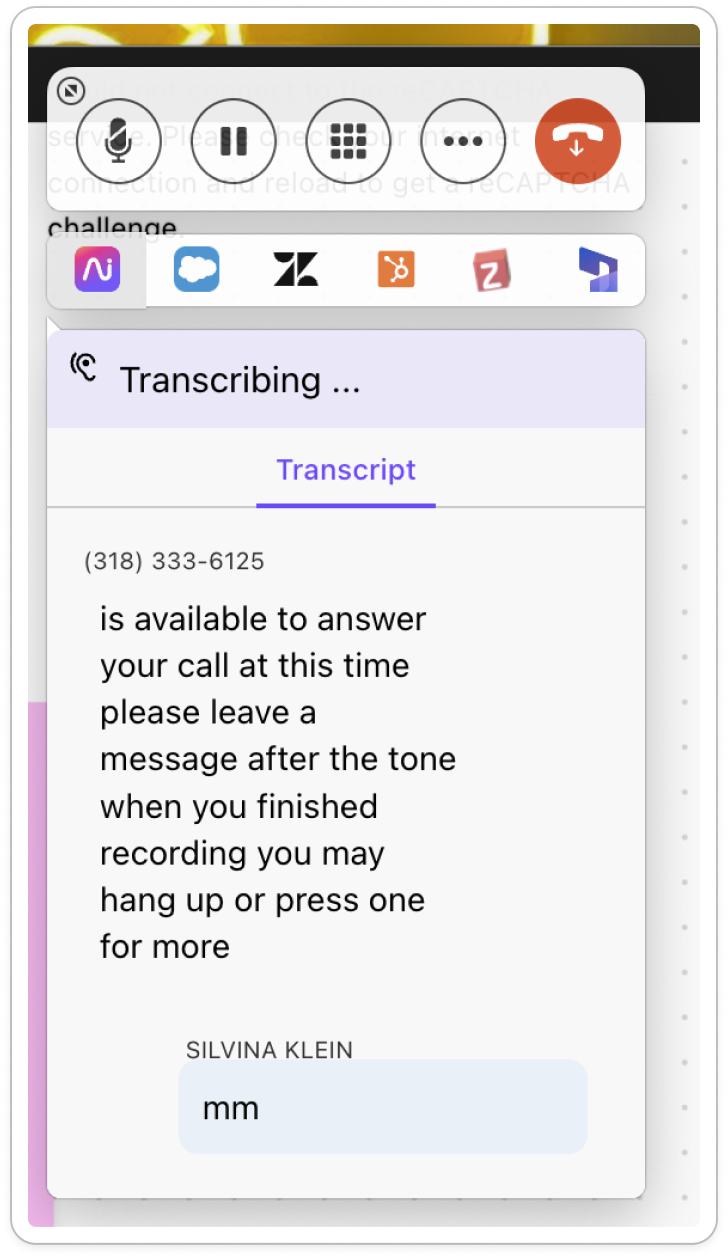
Current Companion Companion mode

COMPACT

The current Dialpad Companion, compact: a small pill with the phone number, call time and a hang-up button Companion mode, compact view: caller details and call controls only

FULL

The current Dialpad Companion: round call buttons, a row of integration icons and a basic transcript panel
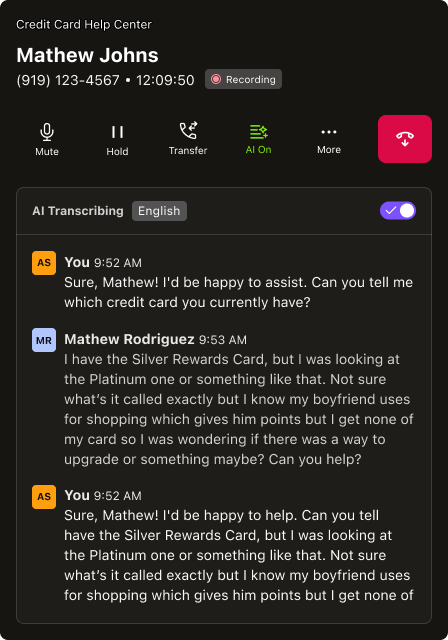
Companion mode, full view: caller details, call controls, AI on and a live AI transcript
Not a reskin: Companion was rebuilt from the code up, on a modern front-end stack, to bring the call bar's controls and AI wherever the agent works.

ONE SYSTEM

The same pattern for every conversation: the call bar, and a meetings bar in the same style, on desktop, web, iOS and Android.

We redesigned the call bar two years earlier, with every main action and live AI in one bar. On iOS it meant a structural redesign that removed old code; Android followed. Engineers built UI kits and shared components for the main call actions, so every surface that uses them stays consistent.

The call bar, close up: caller, Mute, Hold, Transfer, Record, AI On, Share, Park and End Call in one bar
Sample: the call bar, with the call controls and live AI in one place.
The call bar on web: call actions and live AI in one bar, with the transcript beside the conversation The call screen on iOS: transfer, hold, mute, park, record and keypad, with AI one tap away
In context: on web, the call bar sits under the conversation; on mobile, the call controls are the screen itself.

THE WHOLE CALL

V1 covers the call itself. I designed what comes before and after.

So Companion can grow into the agent's whole workflow, in the CRM. Follow an agent at a credit card help center, on a call with Mathew.

Designed

1 · BEFORE THE CALL

She calls Mathew from Salesforce and picks the caller ID: the number and how it shows up.

In EAP

2 · DURING THE CALL

Call controls, live transcript and playbooks float on top of the CRM, so she never leaves the customer’s record.

Designed

3 · AFTER THE CALL

The Deep Summary with action items lands in the CRM, ready to log.

From the AI Recaps case →

KEY DECISIONS

01 / Build on the call bar, not a new pattern

Companion carries the same actions and AI people already knew from the call bar on web, iOS and Android.

02 / Parity first, then integrations

V1 matched what Dialpad Everywhere supported, plus AI transcript. Salesforce and other integrations came in the second stage.

03 / Re-align priorities to reach V1 faster

A triad with the Lead PM and the Sr Calling Engineer, with checkpoints with the CPO and the Design Director. I iterated on their feedback, and we re-aligned business priorities to speed up the timeline to V1.

THE PROTOTYPE

A concept in an hour, then many iterations in code.

I built the first concept prototype in about an hour and kept iterating on it. It made every conversation with stakeholders and design leadership richer: they could try where the product was going, not just hear about it.

Prototype settings switch between V1 and V2, compact and full views, and each feature on or off: AI, playbook, live coach and Salesforce.

Silvina KleinPRODUCT DESIGN LEADER

One AI system: AI Recap → Deep Summaries → AI Assistant (alpha)

+750M AI Recaps generated.People needed insights they could work from.

After a call, support and sales teams on Dialpad Connect had the AI Recap for a quick read, and the full transcript for everything else.

Deep Summaries fills the space in between: the structure and detail they need to act, without reading the whole call.

I led it from MVP to a trusted early access program (EAP): set the priority with product and engineering, and supported the Sr Product Designer to build it as part of our AI system.

AI Recaps: the original short recap in the call card Deep Summaries: the structured summary panel in the Inbox
AI Recaps Deep Summaries is built on top of AI Recaps Deep Summaries

TL;DR

Deep Summaries amplifies the AI Recap: a structured layer between the recap and the full transcript.

THE BET

Deep Summaries: topics, action items and Q&A on top of the recap. Easy to copy, share or export as MD.

CHALLENGE

The MVP regenerated the summary on every click: inconsistent, slow and costly. And it had to work across devices.

APPROACH

Storage before UI. Accuracy over volume. Prototyping in code.

Stored, structured summaries are the base for an AI assistant that can look back at past interactions: one step in a system, from AI Recap to Deep Summaries to the AI Assistant.

Dialpad mobile: the AI Recap with summary and action items, an active call with AI on, and a video meeting with AI on
The same AI across calls and meetings: AI on during the conversation, and a recap with action items after.

KEY DECISIONS

Our principle: incremental improvements, better than perfect.

Ship to an internal EAP as soon as possible, get early feedback and move fast.

01 / Reset the timeline to build the foundation

When I took over, the MVP looked ready but couldn't store summaries, a gap no one had raised. I made it visible and moved the timeline: storage was the base for the AI Assistant. Then I drove its evolution with the Engineering Manager and the team.

02 / Reliable and accurate

Without stored summaries there was no consistency, and without consistency, no trust. Same sections every time, faithful to the transcript, and editable when the AI got it wrong.

03 / Two layers, on demand

The AI Recap had ~85% adoption, so we built on it: its CTA now opens the Deep Summary, generated on demand to control cost. We launched it with GTM so people knew it was there.

AI DESIGN PROCESS

Coding every prototype with AI let us explore for real: faster, with more options, and built on our design system and context. What we designed was much closer to what shipped.

A sample of our sandbox, where we prototyped by recreating part of the app's environment. The summary opens inside the Inbox and the call card, where people already work.

Settings switch scenarios and features. The summary opens with sections to jump between and Ask AI.
Silvina KleinPRODUCT DESIGN LEADER
Couriers App, the largest last-mile delivery app in LATAM. Objective: guide the courier through the end-to-end delivery experience to be productive and keep them engaged; more than 1M active users. TL;DR: guide each step to optimize delivery times; logistics UX across the delivery; we became couriers, designed, tested and iterated; KPIs: earnings per hour, defect rate, churn, idle time. Orders assigned: couriers who got no orders thought the app was broken and churned in 7–10 days. Goal: keep them connected in high-demand areas. What: a demand heatmap at city and street scale. Then the E2E delivery process: order notification, go to store, in store, go to user, delivery, with up to 2 extra orders. Notification: 5% of couriers did not use auto-accept, plus cancellations and rejections. Goal: fewer defects and accept on first assignment. What: a new notification system with map, earnings, distance and instructions, A/B tested; auto-accept for prioritized couriers. Navigation: delays finding the store and changed routes. Goal: lower end-to-end time, defects and support contacts. What: store photo and instructions, and A/B tests explaining the suggested route (up to 33% faster). Order flow: store check-in code validation that works only in the store, and step-by-step pickup. Delivery: time lost finding addresses; door drop-off and hand delivery looked the same. Delivery screens: hand-to-hand with cash, lobby drop-off with photo, and code validation. Fulfillment product design project, courier delivery experience.
Silvina KleinPRODUCT DESIGN LEADER

LEADERSHIP

Two teams, built from 1 and 2.Small leadership, wide scope.

1 → 9

designers on the team I built · org grew 12 → 35+

DialpadProduct Design Manager

Nov 2023 – Oct 2026

Led design for Dialpad Connect: calling, messaging, meetings and rooms, across desktop and mobile.

A SMALL DESIGN LEADERSHIP TEAM

One of two product design managers, in a design org of 35+.

I REPORTED TO

CDOLast 6 months
Sr Design Director3 years

DESIGN LEADERSHIP

Product Design ManagerMe · Connect
Product Design ManagerSupport line of business
Design System ManagerDialtone
Design Ops ManagerOperations
Brand DirectorBrand
Creative LeadBrand

HOW I LED

Growing the team

From 1 to 9 designers, in a design org that grew from 12 to 35+.

Player-coach

Hands-on on Companion and the call bar while leading the team. See the Companion case.

AI in the process

Pushed the team to prototype in code and build AI skills the whole org could use.

2 → 10

designers, researchers and UX writers

RappiProduct Design Director, Fulfillment

Nov 2020 – Jan 2023

Owned all fulfillment design for LATAM’s largest last-mile delivery app.

ALL OF FULFILLMENT

~8 squads, each with a designer, across the three products that move an order.

Courier app

The people who deliver the order.

Shopper app

The people who pick it in the store.

Dark store inventory

The stock behind 10-minute deliveries.

SQUADS

  • Onboarding
  • Earnings
  • Live orders: delivery
  • Live orders: restaurants
  • Live orders: supermarkets
  • Rappi Favor
  • Deliveries

WHO I WORKED WITH

Design at the table with the people running the business.

Founders

Strategy and priorities

VP

Fulfillment and operations

PMs

Day-to-day product partners

HOW I LED

Growing the team

From 2 to 10 designers, researchers and UX writers, across ~8 squads.